





As a free-to-use live cam platform, Stripchat attracts millions of users worldwide. With so many hot models streaming day and night, it’s only natural to wonder:
“Can I record these shows to watch later?” or “Is there a way to save my favorite live streams?”
However, before you hit the record button, you must understand the rules. Is screen recording allowed on Stripchat? Is it legal, or could you face an account ban or even legal trouble?
In this guide, we will clear up all your doubts regarding Stripchat recording, rules, and how to safely enjoy your favorite streams without taking any risks!
Yes, You Can Record Live Streams on Stripchat

On Stripchat, there are always over 10,000 active models performing real-time, highly intimate adult live shows.
Users can not only enjoy public and private chats, but they can also actually record and watch video streams directly within the platform.

By using the official recording feature, you can save your favorite girl’s shows to watch again and again whenever you want to please yourself.
Typically, most adult live cam platforms strictly prohibit recording live broadcasts.
Since live streams are considered copyrighted material, unauthorized recording can technically violate copyright laws.
If you want to record hot live shows legally and without any risk, Stripchat is one of the few overseas platforms that makes this possible.
Over 100 Japanese models are online every night!Experience the Ultimate Excitement!
How to Use the Archive and Recording Feature on Stripchat

Recording a live stream on Stripchat is incredibly simple.
Here is the step-by-step guide on how to use the built-in archive and recording feature:
Step 1: Access the official website and find a model

First, go to the official Stripchat website and browse through the active performers to find a model you would like to record.
Step 2: Enter the room and click “Start Recording”

Enter the model’s chat room. Look at the menu at the top of the chat area, and click on the “Start Recording” button.
Step 3: Confirm the rate and start the recording

A popup will appear saying “Record Public Chat” along with the token cost (e.g., “150 tokens/min”). If you agree to the price, click the “Start Recording” button to begin.
Please keep in mind that you cannot record every single model on the platform. Some performers choose to disable public chat recording in their settings.
However, even if a model does not allow recording in her public room, you may still be able to use the archive and recording feature during a one-on-one Private Chat.
Additionally, the process for recording live broadcasts on a smartphone is essentially the same as on a computer.

Find a model who allows recording, and start taking advantage of the archive feature to save your favorite shows!
How to Watch Your Recorded Videos on Stripchat
Once you have successfully saved your favorite broadcasts, watching them is incredibly easy.
Follow these simple steps to access and play your recorded videos:
Step 1: Go to the official website and select “My Collection”

Log in to your Stripchat account, click on the side menu on the left, and choose “My Collection”.
Step 2: Access your saved archives in “My Media Collection”
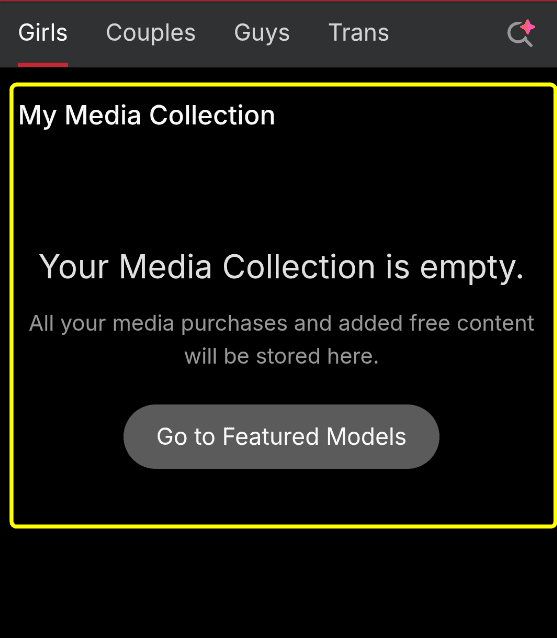
If you do not have any saved videos yet, the screen will display the message: “Your Media COllection is empty”
With just this extremely simple process, you can look back at your favorite premium moments as many times as you want!
Compared to other adult live cam platforms, Stripchat offers a much wider variety of ways to play and customize your personal viewing experience.
Important Safety Precautions When Using Stripchat Recording Feature

When recording live streams on Stripchat, there are several crucial rules and limitations you must keep in mind to keep your account safe:
1. Do Not Use External Screen Recording Software or Tools
Stripchat strictly prohibits the use of external screen recording applications or download tools (such as Leawo Screen Recorder, Bandicam, CleverGet, etc.).
If you want to save a model’s live show, you must only use Stripchat’s official built-in recording feature.
You might think “they won’t find out,” but using third-party software carries a severe risk of getting your account permanently suspended or banned.
Although some blogs and websites introduce workarounds or third-party tools to capture Stripchat videos, you should absolutely avoid them.
For more details on how to protect your account, check out our guide:


Do Not Share Recorded Videos with Others
Stripchat’s archived videos are strictly for personal use only.
Since live stream recordings contain copyrighted material, you are legally prohibited from sharing these videos with third parties.
Distributing recorded files to friends or uploading them to other websites constitutes copyright infringement, which can lead to severe penalties.
Always ensure you play by the rules and enjoy Stripchat without violating their Terms of Service.
3. Direct Downloading of Recorded Videos is Not Allowed
You cannot actually download recorded videos to your local device on Stripchat.
Any show you record using the official archive feature is saved on Stripchat’s cloud servers and can only be played directly within your web browser.
This means you cannot save the recording as an MP4 file on your hard drive or transfer it to other devices.
4. Recording Fees Can Be High Depending on the Model
The cost of using the recording feature varies significantly depending on the performer.
Some popular models charge high rates, sometimes as much as 150 tokens per minute (approximately $15–$18 USD per minute) just to record their public stream.

Because this can quickly drain your token balance, always make sure to double-check the per-minute token rate before you hit the “Start Recording” button.
Conclusion: Safely Enjoy Stripchat with the Official Recording Feature
In this guide, we have explained how to record live streams on Stripchat and how to use the built-in archive feature.
Here is a quick summary of the key takeaways:
Recorded adult videos on Stripchat can be rewatched at any time you want.
Since they are perfect for satisfying your desires, make sure to actively use this convenient feature!
Over 100 Japanese models are online every night!Experience the Ultimate Excitement!


Comments