





Are you wondering if you can really delete your account before signing up for Stripchat?

You can easily delete your Stripchat account using either a PC or a smartphone.
In this article, we will explain the steps to delete or cancel your Stripchat account and how to recover it in an easy-to-understand guide with screenshots.
Things to Do Before Deleting Your Stripchat Account
First of all, there are two things you should do before deleting your Stripchat account.
1. Spend All Your Remaining Tokens
Stripchat is an adult live show platform that is basically free to use.
However, when you want to view paid shows or tip the performers, you need to purchase tokens in advance.
👇Check out our guide on Stripchat token purchases and payment methods here!


Once you delete your Stripchat account, any unused tokens will automatically disappear, so make sure to use them all up beforehand.
You can check your total token balance by logging into your personal profile page.
Also, if you have enabled the auto-recharge feature for tokens, make sure to turn it OFF.
2. Cancel Your Fan Club and Ultimate Memberships
Stripchat’s Fan Club is a service to support specific performers, while the Ultimate Membership is a premium service that enhances your show experience with various features.
The Ultimate Membership is a monthly subscription service that provides various exclusive benefits.


Make sure to complete the cancellation process for both your Fan Club and Ultimate Membership before deleting your Stripchat account.
However, even if you delete your Stripchat account while forgetting to cancel your Fan Club or Ultimate Membership, you can rest assured because those paid subscriptions will automatically be cancelled upon account deletion.
How to Delete Your Stripchat Account (Step-by-Step)
In this section, we will explain the steps to delete your Stripchat account in an easy-to-understand guide with screenshots.
1. Enter Your Username and Password to Log In to Your Profile

First, enter your username and password to log in to your Stripchat personal page.
2. Tap the Three Lines in the Top Right of the Page and Select “Privacy & Settings”
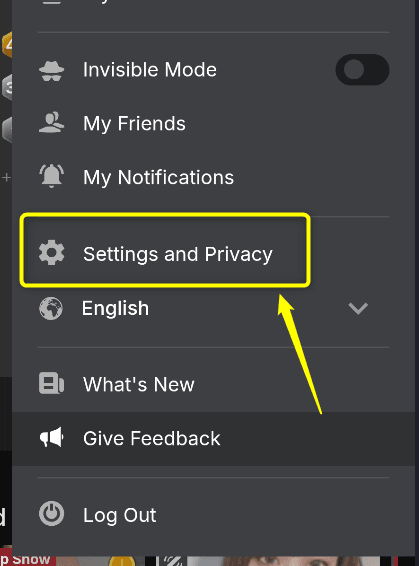
Next, tap the three horizontal lines (menu icon) in the top right corner of the page, and select “Privacy & Settings“.
3. Scroll Down the Page and Tap “Delete Account”
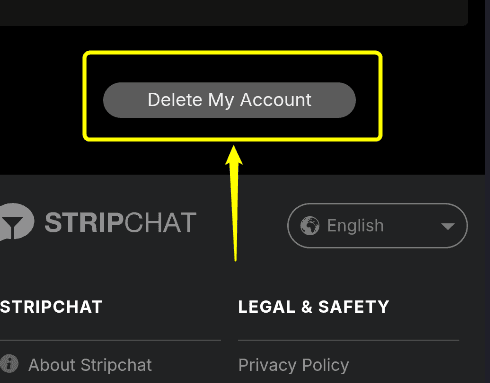
Scroll down to the bottom of the page and tap the “Delete My Account” button.
4. Enter Your Deletion Reason in the Form, Check “I agree to delete my account,” and Tap “Delete”

By doing this, the process to delete your Stripchat account will be complete.
If you attempt to log in using the same account afterward, a warning saying “Your account has been deleted” will be displayed.
It is completely fine to leave the reason for deleting your Stripchat account blank.
How to Recover a Deleted Stripchat Account
Stripchat allows you to recover your account even after you have deleted it.
This is a very useful feature if you accidentally deleted your account but want to enjoy the live shows again.
If you want to restore your account, try to log in again using the username (user ID) and password you used before deleting it.
A warning saying “Your account has been deleted” will appear on the screen, so tap “Restore Account.“
Once you see the message “A restore link has been sent” on your screen, you are good to go.
Open the email sent from Stripchat and click the “Restore my account” link.
The exact grace period for how long you can recover your account is not specified.
However, if you do not complete the process as soon as possible, you might lose the ability to log in with your old account forever.
Conclusion: Key Takeaways on Stripchat Account Deletion
In this article, we explained the steps to delete or cancel your Stripchat account and how to recover your profile.
Here is a summary of the key points from this guide:
You can easily complete your Stripchat deletion process online using either a PC or a smartphone.
However, for free members, you will not be automatically charged unless you actively purchase tokens, so it is also perfectly fine to just leave your account inactive without deleting it.


Comments