




Buying Stripchat tokens is straightforward, but first-time users may have questions about payment methods, credit card security, billing statements, and Auto-Recharge.
This guide walks you through the process using screenshots from a purchase I actually made on Stripchat.
I’ll also explain what happens if your card is declined, how Stripchat payments are processed, and what you should check before entering your payment details.
For safety, always purchase tokens through the official Stripchat website and checkout screen.

I’ve purchased Stripchat tokens myself many times.
The checkout process is simple, but beginners should pay particular attention to Auto-Recharge so they don’t accidentally spend more than intended.
- What to Know Before Buying Stripchat Tokens
- How to Buy Stripchat Tokens: My Real Purchase Walkthrough
- How Stripchat Payments Are Processed
- Why Was My Credit Card Declined on Stripchat?
- What Payment Methods Can You Use on Stripchat?
- Will “Stripchat” Appear on Your Credit Card Statement?
- Stripchat Token Packages and Prices
- Final Thoughts: Buying Stripchat Tokens Safely
What to Know Before Buying Stripchat Tokens
Before purchasing tokens, decide how much you’re comfortable spending.
It’s easy to keep tipping during a fun live show, so setting a budget before you start can help you stay in control.
Another important setting to check is Auto-Recharge.
When enabled, this feature can automatically purchase additional tokens when your balance runs low, so beginners should make sure they understand the setting before turning it on.
My rule is simple: I decide how many tokens I’m willing to use before entering a room.
If you’re buying tokens for the first time, I’d leave Auto-Recharge turned off until you’re familiar with how quickly you normally spend them.
How to Buy Stripchat Tokens: My Real Purchase Walkthrough
You need a Stripchat account before you can purchase tokens.
If you haven’t created one yet, see our step-by-step registration guide below.


Once you’re logged in, you can purchase tokens directly from your account.
The screenshots below are from a real credit card purchase I made on Stripchat, so the current interface may look slightly different if Stripchat updates its checkout page.
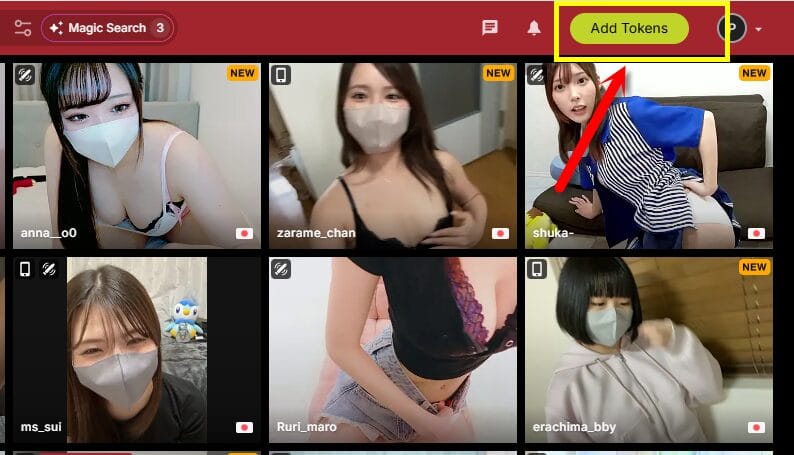
Step 1: Open “Add Tokens”
While logged into Stripchat, click or tap “Add Tokens” to open the purchase screen.
Step 2: Choose Your Token Package and Payment Method
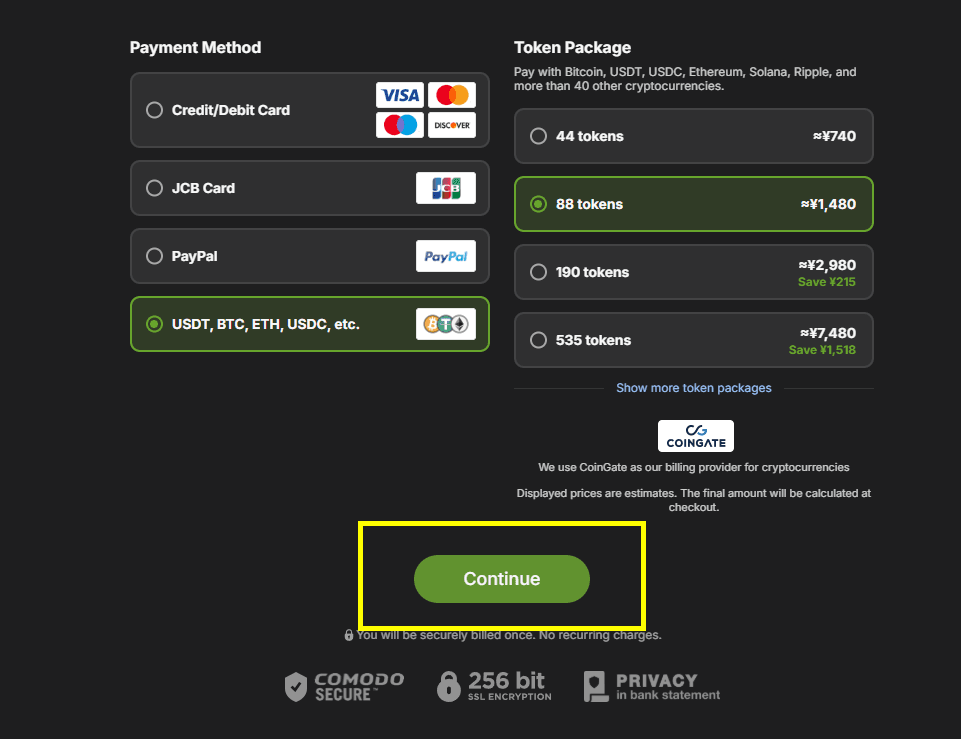
Select the token package you want to purchase and choose from the payment methods currently available to you.
The available options may vary depending on your location and the checkout screen shown to your account.
For this purchase, I chose the smallest token package because I only needed it for this walkthrough.
Once you’ve selected your package and payment method, proceed to the next step.
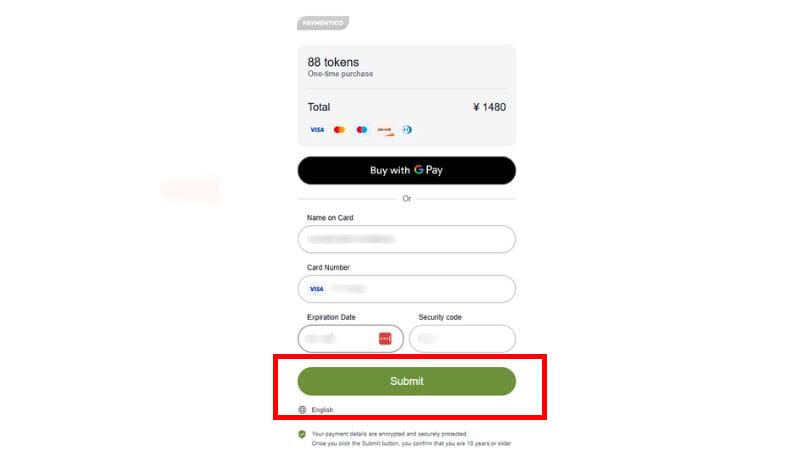
Step 3: Enter Your Payment Details
Enter the payment information requested on the checkout screen.
Before confirming the purchase, double-check the token amount, price, and payment details.
When everything looks correct, complete the purchase.
Step 4: Confirm Your Purchase
After the payment is approved, Stripchat should display a confirmation that the purchase has been completed.
Your token balance should then update in your account.
Depending on your account and payment flow, you may also see an Auto-Recharge option.
If you don’t want additional tokens to be purchased automatically when your balance runs low, make sure you understand this setting before enabling it.
You may also receive a purchase confirmation at the email address registered to your account.
The screenshots above come from an actual purchase I made, not a simulated checkout.
The exact design may change over time, but the basic process is simple: choose your tokens → enter your payment details → confirm the purchase → check your balance.
How Stripchat Payments Are Processed
When you buy tokens, the payment may be handled by a third-party payment processor rather than Stripchat directly.
In my experience with Stripchat, processors such as Epoch and Paymentico have appeared during the payment process.
This is important because the processor shown at checkout can affect how the transaction appears and where you need to go if you have a payment-related issue.
You may not always be able to choose the processor yourself, so check the information displayed on the actual checkout screen before completing your purchase.
What Is Epoch?
Epoch is a payment processor that has been operating since the 1990s and is commonly used by online entertainment services, including adult websites.
If Epoch appears during your Stripchat purchase, follow the payment instructions shown on that checkout screen.
What Is Paymentico?
Paymentico is another payment processor that may appear when purchasing Stripchat tokens.
As with Epoch, the important thing is to verify that you reached the payment screen through Stripchat rather than through an unrelated third-party link.
You don’t need to choose a payment processor just because you see names like Epoch or Paymentico in this guide.
I simply check which processor is displayed during the actual Stripchat checkout and follow the instructions shown there.
Why Was My Credit Card Declined on Stripchat?
If your credit card is declined while buying Stripchat tokens, it doesn’t necessarily mean there is a problem with Stripchat.
The transaction may be rejected by your card issuer or its fraud-prevention system.
Common reasons include:
- Your card has expired
- You’ve reached your credit limit
- Some of the card details were entered incorrectly
- Your card issuer blocked the transaction for security reasons
The fourth reason is one I’ve personally encountered.
Payments to overseas services—or several purchases made within a short period—can sometimes trigger a card issuer’s security system.
In my case, the card company sent a message asking me to confirm whether I had made the transaction.
After confirming that the purchase was mine, I was able to try the payment again.
A declined payment doesn’t always mean your card can’t be used on Stripchat.
If the details are correct, I’d check for an email, SMS, or app notification from the card issuer before immediately trying multiple cards.
What Payment Methods Can You Use on Stripchat?
Stripchat may offer several ways to purchase tokens, including credit or debit cards and other online payment options.
The methods available to you can vary depending on your country, account, and the payment processor used at checkout.
Rather than relying on a fixed list, check the Add Tokens screen after logging in to see the payment methods currently available for your account.
If you’re paying by card, make sure the card type is shown as supported before entering your details.
For the real purchase shown earlier in this guide, I used a credit card successfully.
If your preferred payment method isn’t displayed, don’t try to force the transaction through an unofficial payment service or third-party website.
Will “Stripchat” Appear on Your Credit Card Statement?
If privacy is a concern, you may be wondering what name will appear on your credit card or bank statement after buying Stripchat tokens.
Because payments can be handled by third-party processors such as Epoch or Paymentico, the billing descriptor may show the processor or another transaction descriptor rather than simply displaying “Stripchat.”
The exact wording can vary depending on the payment processor, payment method, and card issuer.
For that reason, I wouldn’t rely on one specific billing descriptor appearing every time.
If you need to identify a charge later, check your Stripchat purchase confirmation and compare the amount and date with the transaction shown on your statement.
Don’t be surprised if the name on your statement doesn’t look exactly like “Stripchat.”
When checking a charge, I find the purchase date and amount more useful than relying on the merchant name alone.
Stripchat Token Packages and Prices
Stripchat offers several token packages, and larger packages may provide a lower cost per token.
However, prices, package sizes, and available purchase options can change, so check the Add Tokens screen for the current price before buying.
If you’re new to Stripchat, there’s no need to buy a large package just because the per-token price looks better.
Starting with an amount that fits your budget also gives you a better idea of how quickly you actually use tokens.
Want to know what those tokens can be used for?
Our Stripchat Pricing & Tokens Guide breaks down the costs of Private Shows, tips, interactive toys, and other paid features.

Final Thoughts: Buying Stripchat Tokens Safely
Based on my own purchases, buying Stripchat tokens is a fairly simple process once you know where to find the Add Tokens screen.
Choose your package, check the payment details carefully, complete the transaction, and confirm that the tokens have been added to your balance.
For first-time buyers, the two things I’d pay the most attention to are staying within your budget and checking the Auto-Recharge setting.
Payment options and checkout screens can change, so always rely on the information displayed during the current Stripchat checkout rather than assuming it will look exactly like the screenshots in this guide.
If you’re ready to purchase tokens, access Stripchat through the official site and check the options currently available for your account.


Comments